Introducing the New Interactive Tab Viewer: Play, Practice, and Export Your Guitar Tabs
Guitar Tab Creator now includes a fully interactive tab viewer — so you can hear your tabs played back with realistic audio, follow along with a moving cursor, and export your work to industry-standard formats, all without leaving your browser.
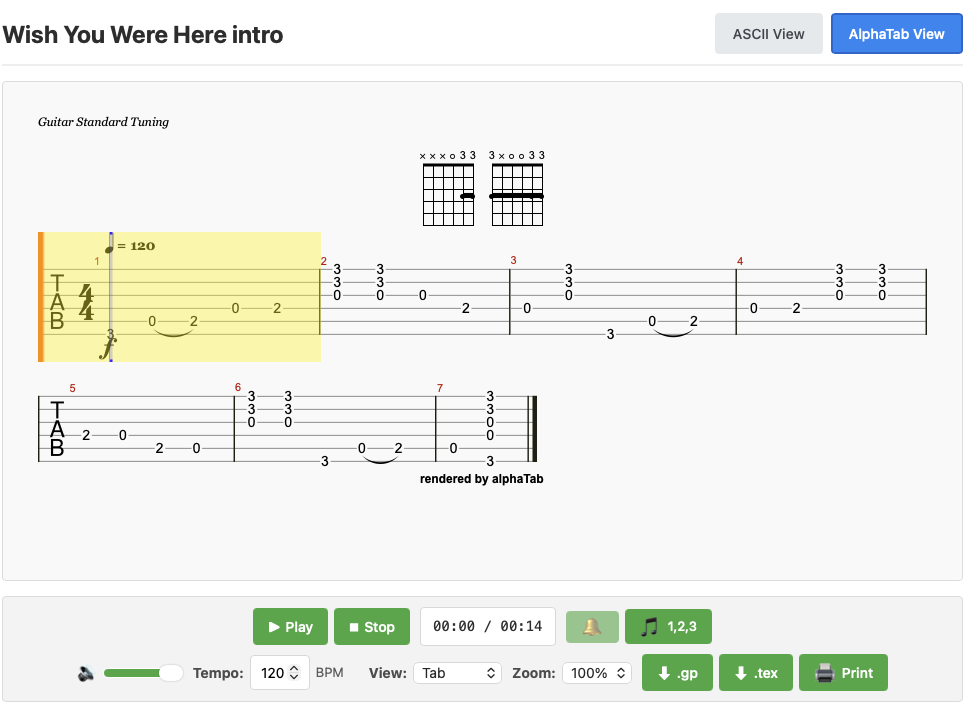
See Your Tab Come to Life
Creating a guitar tab is one thing. Hearing it is another. The new viewer renders every tab you create as professional-quality notation — the same kind you'd find in a paid tab app — right inside Guitar Tab Creator.
A real-time playback cursor moves through the notation as the audio plays, so you always know exactly where you are in the piece. Whether you're proofreading a tab you just wrote or learning one created by another guitarist, you'll never lose your place.
Full Playback Controls — Right in Your Browser
The viewer comes with everything you need for a complete practice session:
- Play, Pause, and Stop — standard transport controls you already know
- Adjustable tempo — slow a tab down to learn a tricky passage, or speed it up as your confidence grows (40–240 BPM)
- Master volume slider — set the level to suit your environment
- Metronome — four volume levels plus off, so you can practise with a click track at the intensity you prefer
- Count-in — start with a one-bar count so you're ready to play along the moment the tab begins
Three Ways to View Your Tab
Not everyone reads music the same way. The viewer gives you three notation styles so you can work in whatever format suits you best:
- Tab — classic guitar tablature with fret numbers on string lines (the default)
- Notation — traditional music staff notation for those who read sheet music
- Both — standard notation and tab stacked together, ideal for learning to read music alongside a tab you already know
You can also zoom in or out (50 %–150 %) to get the best view on any screen size, from a large desktop monitor to a phone propped up on a music stand.
All the Guitar Techniques You Use, Fully Supported
Guitar Tab Creator captures the way you actually play. The viewer understands and displays every technique the app supports:
- Hammer-ons and pull-offs
- Slides (up and down)
- Bends and releases
- Vibrato
- Tapping
- Muted / dead notes
- Chord diagrams — automatically generated when three or more notes are played simultaneously
Works With Every Instrument on Guitar Tab Creator
The viewer isn't just for six-string guitar. It supports every instrument available in Guitar Tab Creator, each with the correct tuning, string count, and playback sound:
- 6-string, 7-string, and 12-string guitar
- 4-string, 5-string, and 6-string bass guitar
- Ukulele, banjo, and mandolin
Each instrument plays back through a matched audio sample, so a bass tab sounds like a bass and a banjo tab sounds like a banjo.
Export to Guitar Pro and More
Your tabs aren't locked inside Guitar Tab Creator. Two export options let you take your work anywhere:
- Guitar Pro 7 (.gp) — open in Guitar Pro, TuxGuitar, or any compatible tab editor
- alphaTex (.tex) — a portable text-based notation format you can open in any text editor or share with other alphaTab-compatible tools
There's also a print button that formats the tab cleanly for paper — useful for taking a tab to a rehearsal or lesson.
Designed to Work on Any Device
The viewer is fully responsive. It works on a desktop browser when you're composing, a tablet propped up at your practice space, or a phone when you're away from your desk. The layout adjusts automatically, and the zoom control lets you fine-tune the size for any screen.
Try It Now
The interactive tab viewer is available on every tab page in Guitar Tab Creator — no extra setup required. Open any tab and the viewer loads automatically. If you haven't created a tab yet, start one now and hear it come to life as soon as you're done.
Have questions about how the viewer works? See the full help guide for a detailed walkthrough of every control.